

What is streaming on YouTube?
Do you want to know what a stream on YouTube is - it is a live broadcast that uses a webcam and a working screen. Read more in our article.
 YouTube Stream - live Internet broadcast. It shows what is currently happening on the other side of the screen.
As a rule, on streams they give comments on any issue, hold giveaways, and communicate with subscribers.
If we briefly explain what a stream is on youtube, then they can be compared to broadcasting a football match live, when TV viewers follow what is happening on the field and at the same time listen to the commentator.
What is and how does obs stream on youtube work?
 Nowadays, gaming streams are considered the most popular on all platforms, attracting thousands of users at the same time.
Some enjoy the game, commenting on the process, others perform interesting experiments live.
Nowadays, gaming streams are considered the most popular on all platforms, attracting thousands of users at the same time.
Some enjoy the game, commenting on the process, others perform interesting experiments live.
Each stream is aimed at a specific audience with a narrow range of interests. Broadcasts are not just for funpastime, but also for the purpose of earning money.
The stream “exists” thanks to a special video capture program that broadcasts it to the network. There is not a large selection of software alternatives here.
One of the market leaders is OBS - Open Broadcaster Software. Its main advantage is that this software is distributed free of charge and offers the user a wide range of capabilities.
 You can find another option on the Internet - Xsplit broadcaster, but it is not free, and the demo version imposes serious restrictions.
For example, during a broadcast in a resolution higher than 720p, the company logo is added to the video, which is not very desirable.
How to set up YouTube for streaming?
The whole process of “obs stream on youtube” can be divided into steps:
Step #1
Make sure you are connected to the Internet and your computer canmaintain a stable connection. Use testing services - speedtest and others. As for the computer, the recommended specifications are:
- 4-core intel i5 processor;
- RAM – from 8GB;
- Operating system – Windows 7;
- Video card – not lower than GTX 970B, 1060;
- Webcam/prof. camera working in conjunction with a PC.
Step #2
If you are not registered on YouTube, then you will need to set up YouTube for streaming, register and create your own channel. Process:
- Go to the main page and select “Creative Studio”
- Agree with the terms of the contract.
- In the upper right corner, find the video camera icon.
- Click on it, then on “Start Broadcast”.
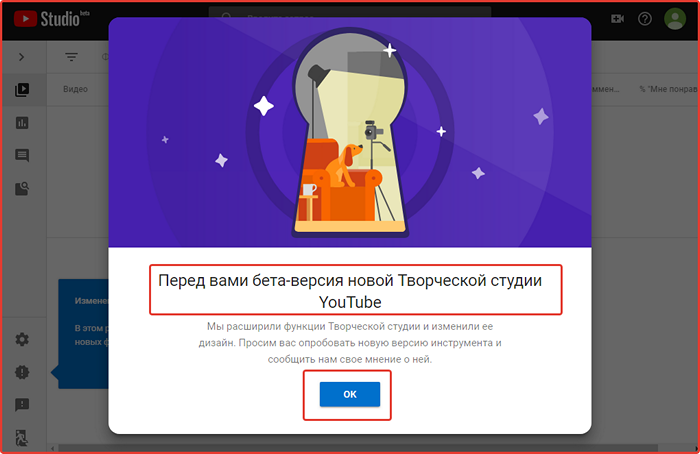
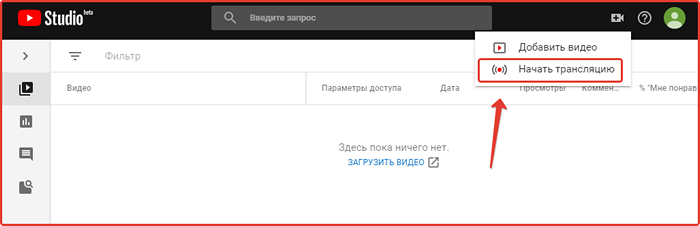
How to set up obs for streaming on YouTube:
- Download OBS and install it on your computer.
- During installation, select the 64-bit version - it provides better performance.
- Launch and go to the “File” menu, then “Settings – “Broadcasting”.
- Enter information from the parameters of the hosting video decoder (YouTube settings – “live broadcast” page - below).
- Go to the “Output” section.
- Set the video bitrate (depending on the resolution).
- In “Audio” we leave everything as standard.
- At the bottom of the main screen, click “sources” and select “+”.
- Click on “Game Capture” and set any value.”
- In another section, click the “Mode” type, then “Capture a separate window.”
- The game for broadcast should already be running - select its launch file and click “OK”.
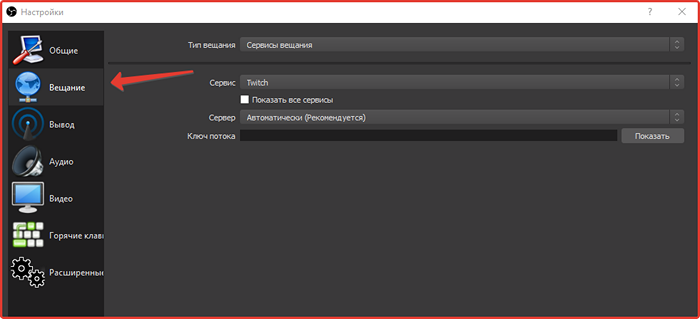
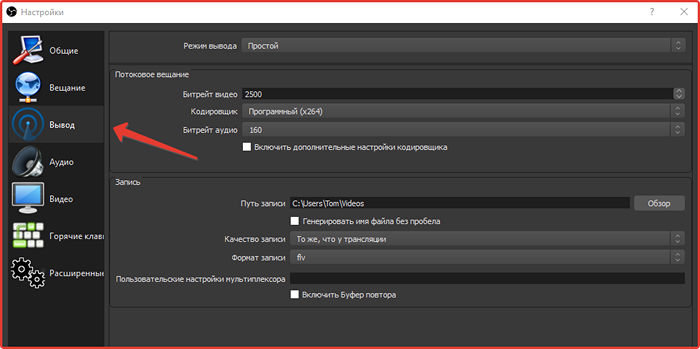

To start live broadcast everything is ready, all you have to do is click on the “Start broadcast” button and open the hosting section - the live broadcast on your channel is already running there.
At the bottom of the program there is a line - it should light up in green, and the “frame skip” form is next to 0, if the YouTube setup for the stream was done correctly. When everything comes together, it’s good – the computer and the network can handle the load.