

What is YouTube Analytics?
From this article you will learn what YouTube Analytics is, how to analyze, draw conclusions and take further actions on your channel!
 Any channel owner, regardless of its size, needs to receive up-to-date information about its statistics.
It is important to know how many people subscribed over a certain period, how many decided to leave, whether the number of views is growing, which videos are the most popular.
And this is only a small part of the information that needs to be obtained for trouble-free use of the service.
There are a large number of statistical services on the Internet, but YouTube Analytics.
Many people will ask the following question - what is YouTube Analytics? This is a specialized service designed to analyze video content.
The main task is to check the effectiveness of the channel as a whole and its individual videos. The resource works with a huge amount of data, including the devices usedfor viewing, sources of new traffic, demographic features, and so on.
In the process of promoting your own channel, you must definitely pay attention to statistical indicators. Otherwise, optimization may be useless.
Attracting and holding the attention of the audience?!
Video recording statistics should not show a sharp drop in traffic during the first 15 seconds. Below we suggest that you familiarize yourself with the obtained statistics of one of the uploaded videos.
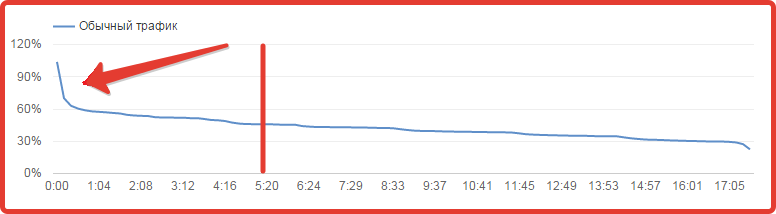
If during the analysis you observe a similar picture, you should think about replacing the beginning. One of the most common reasons for this audience behavior is the presence of a too long video logo (intro).
It is possible that the thumbnail inserted at the beginning is not relevant and it is misleading people.
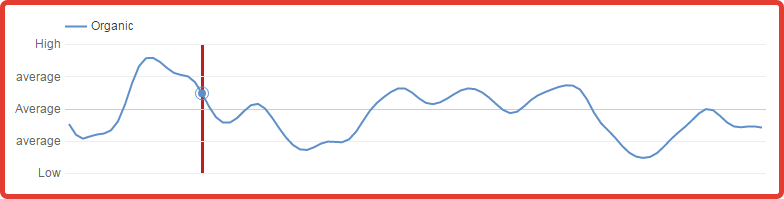
Pay special attention to sudden drops orincreasing retention at certain points in the video. As a rule, the presence of a sharp increase makes it clear that the material is interesting to your target audience.
If there are crashes, it is quite possible that the information provided is of insufficient quality, or there are cited errors.
Owners of video channels also have to deal with situations when it is necessary to insert a fragment into a video that they cannot do without. In this case, it is recommended to include an annotation in the video.
With which you will inform your audience about the imminent publication of new interesting videos. Practice shows that in most situations the quality of retention improves significantly.
Integration with Google Analytics.
Using the YouTube Analytics service, it becomes possible to get acquainted with a large amount of information regarding individual videos.
If your task is to check exactlychannel, additional information can be found using the linked service Google Analytics.
To synchronize two services with each other, you need to run:
- Go to Google Analytics, create a new resource for the channel in it. Be sure to copy your tracking ID.
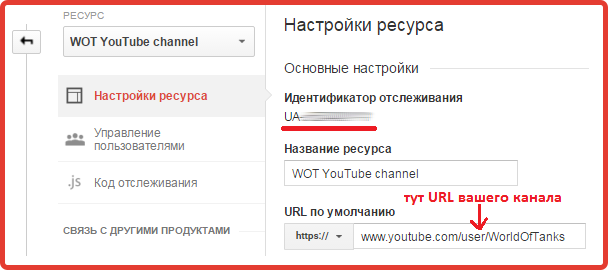
- On the video hosting website, go to the additional settings menu. At the bottom you will find a field with a unique GA ID that you need to insert. After saving all changes, video hosting will begin sending data to Google Analytics.
What will this give for analysis?
By linking google analytics youtube it will be analyzed as a regular site, providing a full set of information. However, please be aware that the information will only be shown within the URL feed.
On Googleyou will be able to view statistical information for this URL, as well as obtain information regarding all feeds and categories that include it. In addition, information is provided on the main page of the video channel.
On the other hand, information on the URLs of individual videos will not be available. If, when switching from the main page, the user lands on video content, GA will not record the transition in statistics.
Now, after receiving basic information regarding the interaction between Google Analytics and YouTube Analytics, we suggest you find out:
What additional information you can receive:
- Checking the quality of the advertising campaign. If you are purchasing advertising for the main page of a channel on YouTube, integration must be carried out.
On the other hand, GA does not provide the opportunity to see the amount of time spent on the site from a specific source, see bounce rates, likesand dislikes and so on; - Checking and reviewing conversion statistics. Experienced users are well aware that when you add the command ?sub_confirmation=1 to the link, you will be taken directly to the subscription page.
Google's service checks the number of clicks on this URL. When this information is correlated with the number of subscribers, it becomes possible to compile statistics on the behavior of subscribers on the channel. If the number of people subscribed and clicks is low, you need to determine the reason; - Statistical information about a specific page. Google Analytics makes it possible to check the number of transitions to pages. For example, you can check the conversion rate of sending emails to an email whose address is published on the “About the channel” page.